Biggest Bravia 9 Qled Buying Mistakes (And How to Avoid Them)
The Sony Bravia 9 represents a significant pivot in high-end television engineering. As Sony’s flagship for the current product cycle, it shifts the spotlight away from the OLED technology that has dominated the brand's premium lineup for years, placing it instead on a revolutionary Mini-LED architecture. While this change brings unprecedented brightness and color volume, it also introduces a new set of considerations for the consumer. Buying a television of this caliber is a major investment, often exceeding several thousand dollars. Unfortunately, many enthusiasts approach the purchase with outdated assumptions or a lack of understanding regarding the specific environmental requirements of Mini-LED technology.
When consumers make mistakes during the purchasing process for the Bravia 9, they often find themselves with a display that feels either underutilized or poorly matched to their living space. This article explores the most common pitfalls encountered when investing in the Bravia 9 QLED, analyzing the technical nuances of the set and providing a comprehensive guide on how to ensure your home theater environment is ready for Sony’s most powerful backlight system to date.
The Evolution of the Bravia 9: A Technical Overview
To understand the potential buying mistakes, one must first understand what makes the Bravia 9 unique. At its core, the Bravia 9 utilizes what Sony calls the XR Backlight Master Drive. This is not merely a high count of local dimming zones; it is a sophisticated control system powered by an ultra-small LED driver that manages thousands of individual dimming zones with 22-bit precision. The goal is to achieve OLED-level blacks while providing the "impact" of high-dynamic-range (HDR) highlights that only a high-output LED system can provide.
The Bravia 9 is built around a QLED (Quantum Dot) layer, which ensures that even at extreme brightness levels, the color saturation remains high. Traditional OLEDs often lose color saturation as they reach peak brightness because they rely on white sub-pixels to boost luminance. The Bravia 9 avoids this, making it a "color volume" champion. Furthermore, Sony has implemented X-Anti Reflection and X-Wide Angle technologies to mitigate the traditional weaknesses of VA (Vertical Alignment) panels. Understanding these features is the first step in avoiding a mismatch between the TV's capabilities and your actual needs.
Common Buying Mistake 1: Ignoring the "OLED vs. Mini-LED" Context
The most frequent mistake buyers make is assuming that the Bravia 9 is simply "better" than an OLED like the Bravia A95L. This is a horizontal shift in technology, not necessarily a vertical one. Many buyers who are used to the perfect, per-pixel ink-black levels of OLED might find the "bloom" of a Mini-LED—however minimized it may be on the Bravia 9—distressing in a pitch-black room. Although the Bravia 9 has the most advanced dimming algorithm Sony has ever produced, a liquid crystal display (LCD) still requires a backlight that can occasionally bleed into dark areas during challenging scenes, such as white text on a black background.
Conversely, buyers often choose an OLED for a bright sunlit living room only to realize it cannot fight the ambient glare. The mistake here is failing to identify the primary lighting condition of the room. The Bravia 9 is designed to dominate rooms with windows and substantial ambient light. If you primarily watch movies at 11:00 PM in a room with no lights on, you might be paying for peak brightness you don't need, while sacrificing the absolute black precision of an OLED.
Common Buying Mistake 2: Underestimating the Size-to-Distance Ratio
The Bravia 9 is available in large formats, starting at 65 inches and moving up to 75 and 85 inches. A common error is buying the largest screen that will fit on the wall without considering the "immersion vs. fatigue" balance. Because the Bravia 9 can hit incredibly high nits (peak brightness), a screen that is too large for a short viewing distance can actually cause eye strain during bright HDR transitions. Sony’s processing is excellent at upscaling, but sitting six feet away from an 85-inch Bravia 9 can make the sheer luminance overwhelming during a midday sports broadcast or an explosion-heavy action movie.
To avoid this, measure your seating distance and cross-reference it with the TV's brightness capabilities. If you are in a smaller space but want the Bravia 9's premium processing, the 65-inch model is often the "sweet spot" that prevents the brightness from becoming a drawback rather than a feature.
Discover deals on TVs & Home Theater — updated daily.
See Deals →Common Buying Mistake 3: Overlooking the Sound System Integration
Many buyers spend their entire budget on the panel and forget the audio. While the Bravia 9 features "Acoustic Multi-Audio+," which includes beam tweeters at the top and side tweeters to make sound feel like it is coming from the screen, it is still physically limited by its chassis. A mistake many make is mounting this TV on a wall and relying solely on the built-in speakers. To truly get the most out of the XR Processor’s audio capabilities, the Bravia 9 should ideally be paired with a Sony soundbar or AV receiver that supports "Acoustic Center Sync." This feature allows the TV speakers to act as the center channel in a larger surround sound system, creating a cohesive soundstage that matches the massive scale of the visuals.
Detailed Product Analysis: Pros & Cons
When evaluating the Bravia 9, it is helpful to break down the performance into specific categories that impact daily use. This TV is a specialist in certain areas and a generalist in others.
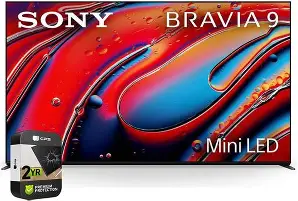
The Strengths of the Bravia 9
- Unmatched Brightness: It can achieve highlights that make sunlight feel tangible on screen, exceeding the capabilities of almost any consumer OLED.
- Precision Control: The 22-bit LED driver significantly reduces the "halo" effect around bright objects, providing a much cleaner image than previous Mini-LED generations.
- Motion Handling: Sony’s XR Motion Clarity remains the gold standard, keeping fast-moving sports and 24fps cinema looking natural without the "soap opera effect."
- Build Quality: The TV features a premium "One Slate" design with a versatile four-way stand that allows for various heights (to accommodate soundbars) and widths.
- Color Accuracy: Out-of-the-box calibration in Professional Mode is exceptionally close to the creative intent of colorists, requiring minimal professional calibration for most users.
The Weaknesses of the Bravia 9
- Viewing Angles: Despite the X-Wide Angle technology, there is still a slight shift in contrast and color when viewed from extreme off-center positions compared to OLED.
- Thickness: To accommodate the complex Mini-LED backlight, the chassis is thicker than the razor-thin OLED counterparts, which may affect those seeking a flush-to-wall mounting aesthetic.
- Price Premium: As a flagship, it commands a price tag that places it in competition with ultra-high-end displays, making the value proposition difficult for casual viewing.
- Reflective Coating: While the anti-reflection coating is effective, it can occasionally create a "rainbow" smear effect when hit by direct, concentrated light sources like a single uncovered lamp.
Bravia 9 vs. The Alternatives
To help visualize why the Bravia 9 might be the right (or wrong) choice, consider how it compares to its internal and external competitors. Most buyers are choosing between this and the flagship OLED (A95L) or the previous year's high-end Mini-LED (X95L).
| Feature | Bravia 9 (Mini-LED) | Bravia A95L (QD-OLED) | Bravia X95L (Previous Gen) |
|---|---|---|---|
| Peak Brightness | Ultra High (Best for bright rooms) | Moderate-High (Best for controlled light) | High |
| Black Levels | Near-Perfect (Mini-LED) | Perfect (Infinite Contrast) | Good (Some blooming visible) |
| Color Volume | Exceptional at high brightness | Exceptional at all levels | Very Good |
| Gaming Features | HDMI 2.1, VRR, ALLM | HDMI 2.1, VRR, ALLM | HDMI 2.1, VRR, ALLM |
| Reflections | X-Anti Reflection (Excellent) | Glossy (Very Good) | Standard Anti-Reflect |
Common Buying Mistake 4: Not Validating HDMI Hardware Needs
Modern flagship TVs like the Bravia 9 are often used as the centerpiece of a gaming or high-end media setup. A critical mistake buyers make is neglecting their cable infrastructure. The Bravia 9 supports 4K at 120Hz, Variable Refresh Rate (VRR), and Auto Low Latency Mode (ALLM). However, many users attempt to connect their PlayStation 5, Xbox Series X, or high-end PC using old HDMI 2.0 cables they found in a drawer. This results in the TV downscaling the signal or failing to trigger the specialized "Game Menu" features.
Additionally, users must be aware that Sony typically offers two HDMI 2.1 ports, one of which is the eARC (Enhanced Audio Return Channel) port. If you have two gaming consoles AND a soundbar, you may find yourself in a situation where one console is forced into a standard HDMI 2.0 port, limiting its performance. To avoid this, plan your connections ahead of time and consider an HDMI 2.1 switcher if you have multiple high-bandwidth devices.
Common Buying Mistake 5: Setting the TV to "Vivid" Mode Immediately
The Bravia 9 is capable of searing brightness, and showroom floors often exploit this by setting the TV to "Vivid" or "Store" mode. A common mistake for new owners is keeping these settings at home. While visually "poppy," Vivid mode destroys the nuances of the XR Processor's color accuracy. It oversaturates skin tones and crushes detail in bright clouds or dark shadows.
To avoid this and truly appreciate your purchase, switch the TV to "Professional" or "Cinema" mode. If you are watching Netflix, enable the "Netflix Adaptive Calibrated Mode." This allows the TV’s light sensor to communicate with the processor and adjust the picture based on the ambient light in your room without sacrificing the director's intended color palette.
Buying Guide: How to Determine if the Bravia 9 is Right for You
If you are still on the fence, use the following criteria to determine if the Bravia 9 matches your lifestyle and technical requirements. This guide focuses on real-world use cases to ensure no buyer's remorse occurs after the delivery van leaves.
Find top-rated TVs & Home Theater products at great prices.
Shop Amazon →Step 1: The Room Audit
Walk into your television room at the time of day you most frequently watch content. If you see significant glare on your current TV, or if the room feels "washed out" by sunlight, the Bravia 9 is likely your best choice. Its high native contrast combined with the backlight's raw power allows it to maintain a punchy image where OLEDs might look dull. However, if you only watch in a basement with no windows, reconsider the A95L OLED for that "inky" cinematic look.
Step 2: The Content Mix
What do you watch? The Bravia 9 is an "all-rounder." If your diet consists of 50% daytime sports (football, racing), 30% news/talk shows, and 20% movies, the Mini-LED is superior because it handles high-average-picture-level (APL) content with ease and has no risk of "burn-in" from news tickers or scoreboards. If you are a 100% "physical media" film buff who only watches 4K Blu-rays in the dark, the benefits of the Bravia 9’s brightness might be secondary to the pixel-perfect blacks of an OLED.
Step 3: Future-Proofing Requirements
The Bravia 9 is part of Sony's push toward a more sustainable and efficient LED technology. By using the XR Backlight Master Drive, it uses significantly less power to achieve higher brightness compared to older LED models. If you are someone who keeps a TV for 7 to 10 years, the Bravia 9 is a safer long-term bet than an OLED, as LED panels generally have a longer lifespan before any noticeable degradation in peak luminance occurs.
Step 4: Checking the Stand Requirements
Measure your furniture. The Bravia 9 is heavy and its feet are substantial. While Sony provides multiple positions for the feet (wide, narrow, and raised), the 85-inch model requires a very sturdy and deep media console. Many buyers forget to check if their current stand can support the weight of a premium 85-inch Mini-LED, which is considerably heavier than a budget-tier LED of the same size.
Conclusion: Success with the Bravia 9
The Sony Bravia 9 is a masterclass in display engineering, bridging the gap between the high-octane brightness of traditional LEDs and the precision of self-emissive technologies. Avoiding the biggest buying mistakes comes down to a realistic assessment of your environment and your viewing habits. By choosing the correct size, ensuring your room lighting matches the panel's strengths, and investing in the proper peripheral hardware, you can turn this TV into a generational centerpiece for your home entertainment.
Ultimately, the Bravia 9 rewards the educated consumer. It is a television designed for those who want the most "life-like" image possible—an image defined not just by deep blacks, but by the brilliant, high-energy light that defines our world. By sidestepping the pitfalls of poor room placement, inadequate cabling, and incorrect picture settings, you ensure that your investment in Sony’s flagship Mini-LED pays dividends in cinematic enjoyment for years to come. The Bravia 9 isn't just a screen; it's a statement on the future of high-brightness home cinema.