5 Hidden Features of the Hp Omnibook Ultra Flip 14 You Must Know About
The landscape of premium 2-in-1 laptops has undergone a significant transformation with the introduction of AI-integrated silicon. While many consumers focus on the headline specifications—processor speed, RAM capacity, and screen resolution—the true value of a machine often lies in the nuanced features that enhance daily productivity and long-term usability. The HP Omnibook Ultra Flip 14 represents a pivot for HP, moving away from the long-standing Spectre branding toward a unified "Omnibook" identity that emphasizes versatility and intelligence. Beneath its sleek moonstone grey exterior lies a series of engineering choices and software refinements that many users might overlook during their first few weeks of ownership.
In this detailed analysis, we explore five hidden features of the HP Omnibook Ultra Flip 14 that set it apart from its predecessors and competitors. From specialized thermal management to advanced AI privacy protocols, these features define the modern computing experience. This article serves as a comprehensive guide for potential buyers and current owners who want to extract every bit of value from this high-end convertible.
Detailed Product Analysis: The AI PC Reimagined
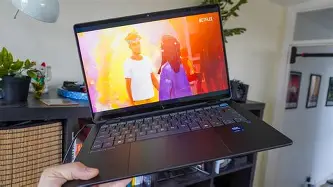
The HP Omnibook Ultra Flip 14 is built around the Intel Core Ultra Series 2 architecture, colloquially known as Lunar Lake. This shift is critical because it prioritizes efficiency and NPU (Neural Processing Unit) performance over raw multi-core thermal throttling. The chassis itself is a masterclass in minimalist design, featuring a centered haptic touchpad and a keyboard deck that feels rigid despite the device's thin profile. Unlike previous iterations, HP has moved the ports slightly away from the rear corners, opting for a more traditional layout that accommodates the 360-degree hinge movement more effectively.
One of the most striking aspects of the Ultra Flip 14 is the 2.8K OLED display. While OLED is no longer a "hidden" technology, HP's implementation includes a variable refresh rate that scales from 48Hz to 120Hz. This is paired with an anti-reflective coating that manages to suppress glare without the graininess often associated with matte touchscreens. The integration of 50 or more TOPS (Trillions of Operations Per Second) from the NPU allows the laptop to handle background tasks like eye-tracking, background blur, and noise cancellation with almost zero impact on the primary CPU and GPU cores.
1. Proactive Privacy: The AI-Driven Walk-Away Lock
Most laptops offer basic facial recognition via Windows Hello, but the HP Omnibook Ultra Flip 14 utilizes its dedicated NPU to power a more sophisticated set of Presence Sensing features. Hidden within the HP Command Center is the "Walk-Away Lock" and "Wake on Approach" system. Many users find traditional timeout settings frustrating—either the screen stays on too long, wasting battery, or it shuts off while you are still reading a document.
The Ultra Flip 14 uses low-power AI sensors to detect when the user has physically moved away from the device. Within seconds of your departure, the screen dims and the system locks, protecting sensitive data in public spaces like coffee shops or open offices. Conversely, as you approach the laptop, it senses your presence and initiates the IR camera for Windows Hello before you even touch the keyboard. This seamless transition feels like the laptop is "waking up" with you, reducing the friction of logging in dozens of times per day. Furthermore, the "Privacy Alert" feature can detect if someone is looking over your shoulder, providing a subtle notification or blurring the screen to prevent visual hacking.
2. The Haptic Touchpad’s Granular Customization
HP has transitioned from a mechanical diving-board trackpad to a fully haptic "HP Imagepad." While the lack of moving parts increases durability and allows for clicks anywhere on the surface, the hidden feature lies in the software-defined feedback. Users can navigate to the Windows settings or the HP-specific utility to adjust the "click" intensity and the touch sensitivity. This is particularly useful for creatives who might need a "lighter" touch for precision movements in photo editing software or a "heavier" click to simulate the feel of a traditional mouse during heavy data entry.
Moreover, the touchpad supports lateral gestures that are specifically tuned for the 14-inch aspect ratio. Because the touchpad is unusually large for a 14-inch 2-in-1, HP has implemented palm rejection algorithms that are significantly more aggressive than those found on budget models. This ensures that even if your palm rests on the edge of the glass while typing, the cursor remains stationary. It is a subtle engineering feat that prevents the "jumping cursor" syndrome that plagues many ultra-portables.
3. Intelligent Power Management and Thermal "Zero-Throttling"
The Intel Lunar Lake chips are designed to stay cool, but HP has implemented a hidden thermal profile known as "Smart Sense." Traditional laptops require users to manually toggle between "High Performance," "Balanced," and "Power Saver." The Omnibook Ultra Flip 14 uses machine learning to monitor your workflow. If the system detects you are running a heavy rendering task while plugged into power, it automatically ramps up the fan curve and shifts the TDP (Thermal Design Power) limits without user intervention.
Find top-rated Laptops & Computers products at great prices.
View Offers →Perhaps more impressive is the "Fanless" mode for light tasks. During web browsing, document editing, or media consumption, the laptop operates in a passive-cooling state. This is achieved through a redesigned heat pipe system and a bottom vent that maximizes airflow even when the device is in "Tent" or "Tablet" mode. For students or professionals working in quiet libraries, the ability to maintain peak performance without audible fan noise is a transformative experience that is often overshadowed by flashy benchmark scores.
4. Studio-Quality Audio Tuning with AI Noise Reduction
HP’s partnership with Poly (formerly Plantronics and Polycom) has yielded a hidden gem in the audio settings: the Poly Studio-tuned quad speakers and the AI-enhanced microphone array. While most laptop microphones sound tinny and pick up significant background hum, the Ultra Flip 14 includes a dedicated AI-noise reduction engine that filters out non-human sounds. In a real-world scenario, you could be typing on the tactile keyboard or shuffling papers during a Zoom call, and the person on the other end would only hear your voice.
The quad-speaker setup also features a hidden "Dynamic Audio" mode. The system detects the orientation of the laptop—whether it is in Clamshell, Tent, Stand, or Tablet mode—and adjusts the stereo channels accordingly. This ensures that the high-frequency notes are always directed toward the user, preventing the muffled sound that often occurs when a laptop is folded into a tablet and the speakers are pressed against a flat surface or the user's lap.
5. Sustainable Longevity: The Battery Health Manager
A major concern for buyers of premium laptops is battery degradation over a three-to-five-year period. HP includes a "Battery Health Manager" hidden within the BIOS and the HP Support Assistant. Unlike standard charging logic that always pushes the battery to 100%, HP’s "Max Quality" setting limits the maximum charge to 80% if it detects the laptop is consistently plugged into a docking station or charger. This prevents the lithium-ion cells from sitting at high voltage levels for extended periods, which is the primary cause of battery swelling and capacity loss.
Additionally, the 64Wh battery supports fast charging through its Thunderbolt 4 ports, but it does so intelligently. It will fast-charge to 50% in roughly 30 minutes and then taper off to a trickle charge to protect the battery’s chemical integrity. For users who plan on keeping their laptop for several years, this feature is far more valuable than the total battery life on day one, as it ensures the device remains portable for the duration of its lifecycle.
Pros and Cons: The Balanced View
Every premium device involves a series of trade-offs. While the HP Omnibook Ultra Flip 14 excels in many areas, consumers must weigh its innovative features against its price and specific hardware limitations.
- Pros:
- Exceptional 2.8K OLED display with 120Hz variable refresh rate and superb color accuracy.
- Advanced NPU performance enables long-lasting battery life during AI-intensive background tasks.
- The 9MP webcam is among the best in its class, offering clear visuals even in low-light office environments.
- Sturdy 360-degree hinge allows for seamless transition between laptop and tablet modes.
- Premium haptic touchpad and tactile keyboard provide an industry-leading typing and navigation experience.
- Strong focus on sustainable materials, including recycled metals and ocean-bound plastics in the construction.
- Cons:
- Premium pricing puts it at the top of the consumer market, making it an investment rather than a casual purchase.
- The 14-inch frame may feel slightly heavy when used as a primary tablet for extended periods.
- Limited port selection (focusing on USB-C/Thunderbolt) may require users to carry dongles for older peripherals.
- OLED displays, while beautiful, can consume more power when displaying bright, white backgrounds compared to traditional Move-LCDs.
Hardware Comparison: The Competitive Landscape
To understand the value of the HP Omnibook Ultra Flip 14, it is helpful to see how its core specifications compare to other leading 2-in-1 and ultra-portable devices in the 14-inch segment.
| Feature | HP Omnibook Ultra Flip 14 | Competitor A (Premium 2-in-1) | Competitor B (Thin & Light) |
|---|---|---|---|
| Processor | Intel Core Ultra (Series 2) | Intel Core Ultra (Series 1) | Qualcomm Snapdragon X Elite |
| NPU Performance | 48+ TOPS | 11-34 TOPS | 45 TOPS |
| Display Type | 2.8K OLED (120Hz VRR) | IPS LED (60Hz) | OLED (90Hz) |
| Battery Life (Est.) | 16-20 Hours | 10-12 Hours | 18-22 Hours |
| Weight | ~2.9 lbs | ~3.1 lbs | ~2.7 lbs |
Buying Guide: Is the Omnibook Ultra Flip 14 Right for You?
Choosing a laptop in the $1,200 to $1,800 range requires a clear understanding of your personal and professional needs. The HP Omnibook Ultra Flip 14 is not a generic machine; it is a specialized tool for specific types of users.
The Mobile Professional
If your day involves constant transitioning between meetings, airports, and remote workspaces, the battery efficiency of the Series 2 Intel chips is a game-changer. The 9MP webcam and AI noise-canceling microphones mean you can take professional video calls from anywhere without worrying about looking grainy or sounding muffled. The "Walk-Away Lock" feature provides that extra layer of security that is essential when working in public spaces.
Discover deals on Laptops & Computers — updated daily.
Browse Now →The Student and Researcher
For those who spend hours reading digital textbooks or writing long-form papers, the 120Hz OLED screen reduces eye strain by providing smoother motion and higher contrast. The ability to flip the device into "Tent" mode makes it an excellent companion for following along with lecture videos or digital workshops. The integrated pen support (though often sold separately) allows for natural note-taking during classes.
The Creative Enthusiast
While not a dedicated gaming or high-end video editing workstation, the Ultra Flip 14 is perfect for photo editing, vector illustration, and social media content creation. The 100% DCI-P3 color gamut ensures that what you see on the screen matches the final output. The AI-driven performance boosts in apps like Adobe Lightroom allow for faster subject masking and background removal, tasks that previously required a much bulkier machine.
What to Look For When Configuring
When purchasing the Omnibook Ultra Flip 14, prioritize RAM over storage. Because the Series 2 processors utilize on-package memory in some configurations, ensuring you have at least 16GB (or preferably 32GB) is vital for future-proofing your AI workflows. Storage can often be augmented with cloud services or external drives, but the integrated memory cannot be upgraded later. Additionally, look for bundles that include the HP Rechargeable Tilt Pen to fully utilize the "Flip" functionality of the 360-degree hinge.
Real-World Use Cases: Beyond the Specs
To truly appreciate the "hidden" features mentioned above, consider the daily life of a project manager using this device. In the morning, they might use the laptop in clamshell mode to respond to emails, benefiting from the tactile feedback of the keyboard. During a mid-day presentation, they flip the device into "Stand" mode to show a project timeline to a client, where the AI orientation-sensing speakers ensure the audio is clear and loud.
In the evening, they might switch to "Tablet" mode to review blueprints or documents. At this point, the "Smart Sense" thermal management keeps the device cool to the touch, preventing the discomfort often associated with high-performance tablets. If they step away from their desk at a shared coworking space to grab a coffee, the "Walk-Away Lock" ensures their confidential client data remains secure. These aren't just technical specifications; they are solutions to the subtle annoyances of modern computing.
The HP Omnibook Ultra Flip 14 is a reflection of where the industry is heading—away from "bigger and faster" and toward "smarter and more efficient." By focusing on the interplay between the hardware and the NPU, HP has created a device that anticipates user needs rather than just reacting to them. For the buyer who values privacy, audio-visual excellence, and long-term hardware health, these hidden features make the Ultra Flip 14 a standout choice in a crowded field of ultra-portables.
Conclusion
The HP Omnibook Ultra Flip 14 represents more than just a name change for HP's premium line. It is a cohesive attempt to integrate artificial intelligence into the core functionality of a laptop without making it feel like a gimmick. The five features discussed—AI-driven privacy, haptic customization, intelligent thermal management, Poly-tuned audio, and battery health protection—work together to create a user experience that is greater than the sum of its parts. While the ultra-portable market remains highly competitive, the attention to detail in the "hidden" areas of the Omnibook Ultra Flip 14 ensures it remains a top contender for anyone seeking a versatile, high-performance 2-in-1. Understanding these features allows users to move past the marketing jargon and truly master their device for maximum productivity and enjoyment.